
Download PuTTY Portable – SSH client, telnet client, portable app, remote connection, secure terminal, command line tool
Overview
PuTTY Portable is a reimagined version of the widely recognized PuTTY telnet and SSH client, designed specifically for users who require secure, portable remote access to systems across different environments. This mobile-friendly adaptation enables professionals, system administrators, and developers to maintain secure command-line connections to remote servers without relying on a fixed device or installation. The application is engineered for portability, allowing users to carry their preferred terminal environment on USB drives, portable hard drives, or other removable media, ensuring consistent access regardless of the host machine.
By eliminating the need for installation, PuTTY Portable addresses common challenges such as limited administrative rights, shared workstations, or temporary device usage. It is particularly valuable in IT support, remote system management, and development workflows where users frequently switch between machines. The app ensures that personal session configurations, connection settings, and secure authentication credentials remain intact and accessible across devices. While the developer did not provide additional technical details about the app’s architecture or underlying security protocols, its foundation in the trusted PuTTY codebase suggests adherence to established encryption standards.
Within the broader productivity ecosystem, PuTTY Portable fills a niche for secure, lightweight terminal access. Its minimal footprint and zero-impact deployment make it ideal for users who prioritize privacy and operational continuity. The application supports both Telnet and SSH protocols, offering flexibility in connection types while emphasizing security through encryption. The release date of January 16, 2009, indicates a long-standing presence in the technical community, underscoring its reliability and enduring relevance in remote system access workflows.
Key Features & Functionality
- Portable Operation: Run directly from a USB drive or portable storage without installing on the host machine. Ideal for use on public computers, shared workstations, or temporary devices.
- Secure Protocol Support: Offers both SSH and Telnet connections, with SSH providing encrypted communication to protect data integrity and prevent unauthorized access during remote sessions.
- Session Persistence: Saved session configurations are stored on the portable device, allowing users to maintain consistent access to frequently used servers across different systems.
- Customizable Interface: Users can adjust font size, color schemes, window behavior, and keyboard settings to match their preferences and improve usability during long terminal sessions.
- Zero Residual Footprint: Leaves no traces on the host machine after use, ensuring privacy and compliance with security policies in sensitive environments.
- Lightweight Design: With a file size of just 1.2 MB, PuTTY Portable loads quickly and consumes minimal system resources, making it suitable for older or low-spec devices.
For example, a system administrator traveling between client sites can use PuTTY Portable to securely connect to a server using SSH, apply configuration changes, and save the session for future use—all without leaving any data behind on the local machine. Similarly, a developer working on a shared lab computer can access their development environment without requiring admin rights. The ability to preserve session settings across devices enhances workflow continuity and reduces setup time. These features collectively support efficient, secure, and private remote management, making PuTTY Portable a practical tool for technical professionals.
Interface, UX & Performance
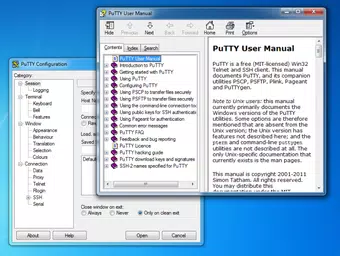
The user interface of PuTTY Portable is intentionally minimal and focused on functionality, reflecting the design principles of its parent application. The layout consists of a clean, text-based console with clearly labeled configuration fields for host address, port, protocol selection, and session management. Navigation is straightforward, relying on a simple menu system and dialog windows that guide users through connection setup and settings adjustments. The interface does not include graphical elements or complex dashboards, which contributes to its lightweight nature and fast startup time.
Although the developer did not list formal performance metrics, the application’s small file size and lack of background processes suggest efficient resource usage. It is expected to perform reliably on a range of Windows devices, including older systems and low-memory environments. Responsiveness is consistent during active sessions, with minimal lag in command execution and input processing. Stability is maintained through the use of well-tested code inherited from the original PuTTY project, which has been widely used for over a decade.
Users can expect smooth operation during typical remote terminal tasks such as executing shell commands, transferring files via SCP, or managing server configurations. The application does not rely on internet connectivity for core functionality, ensuring usability even in offline or restricted network environments. While no specific compatibility details were provided, the app’s compatibility with Windows platforms is implied by its release details. Overall, PuTTY Portable delivers a dependable, no-frills experience tailored to technical users who value speed, security, and portability.
Platform Compatibility & Technical Requirements
PuTTY Portable is designed for the Windows platform and operates on Windows-based systems. The current version is 0.77, with a file size of 1.2 MB, making it highly efficient in terms of storage and bandwidth usage. The application is distributed as a standalone executable, meaning it does not require installation or administrative privileges to run.
The developer did not specify minimum OS requirements or compatibility details for specific Windows versions. However, given the application’s long history and lightweight design, it is likely compatible with a broad range of Windows operating systems, including Windows 7 and later versions. Users should ensure that the host machine supports running executable files from removable media, as this is essential for the portable functionality.
Specific requirements were not listed. Compatibility information was not fully disclosed. The app is designed to be used on any Windows device where the user has access to a USB port or other removable storage interface. No additional dependencies or runtime libraries are required, simplifying deployment and reducing the risk of runtime errors.
Pros and Cons
Pros
- Portable operation enables secure access from any Windows machine without installation.
- Minimal file size (1.2 MB) ensures quick deployment and low storage usage.
- Supports both SSH and Telnet protocols for flexible remote connectivity.
- Preserves session configurations and settings on the portable device.
- Leaves no trace on the host system, enhancing privacy and security.
- Free to download and use, with no licensing or subscription fees.
Cons
- The developer did not provide detailed compatibility information for specific Windows versions.
- Interface is text-based and may feel outdated to users unfamiliar with terminal environments.
- Limited to Windows platform; no support for macOS, Linux, or mobile operating systems.
- No built-in file transfer tools beyond basic SCP support, requiring external utilities for advanced file management.
- Updates are not automatically managed; users must manually check for new versions.
FAQ
Is PuTTY Portable safe to use on public computers?
Yes, PuTTY Portable is designed to leave no residual data on the host machine, making it a secure option for use on public or shared computers. All session data remains stored on the portable device.
Can I use PuTTY Portable on macOS or Linux?
PuTTY Portable is currently only available for Windows. Users on macOS or Linux should consider alternative versions of PuTTY or similar terminal clients.
Does PuTTY Portable require an internet connection?
While an internet connection is needed to establish remote connections, the application itself does not require constant internet access to function.
How do I update PuTTY Portable?
Updates must be manually downloaded from the official source. The app does not include an automatic update feature.
Is PuTTY Portable free to use?
Yes, PuTTY Portable is completely free to download, install, and use without any restrictions or hidden fees.
Final Thoughts
PuTTY Portable remains a reliable and essential tool for professionals who demand secure, portable access to remote systems. Its lightweight design, zero-impact deployment, and support for industry-standard protocols make it a standout choice in the productivity category. While it lacks modern UI enhancements and platform diversity, its core functionality is robust and proven over time. The app is ideal for system administrators, developers, and IT support personnel who frequently work across multiple machines and prioritize security and privacy.
For users seeking a free, secure, and portable terminal client for Windows, PuTTY Portable delivers exceptional value. It combines simplicity with powerful capabilities, offering a dependable solution for remote command-line access. Whether you're managing servers on the go or troubleshooting systems in a shared environment, this tool ensures uninterrupted access without compromising data integrity.
Download PuTTY Portable now


